Friday, 18 September 2020

 Hyperlink on Field for SSRS report in D365FO

My requirement is to open a report on sales order or a transfer order depends on the caller.

After running the report it should open the sales order based on SalesId


Change the below properties
1. Color
2. Textbox properties > Action >Go to URl > select URL
    Write the below code in expression
    =Microsoft.Dynamics.Framework.Reports.BuiltInMethods.GenerateDrillThroughLink(Parameters!AX_ReportContext.Value, Parameters!AX_UserContext.Value, "SalesTable", "Display", "SalesTable", "SalesId", First(Fields!AGCReference.Value, "PalletLabelsPrintTmp"))


Format:
3
=Microsoft.Dynamics.Framework.Reports.BuiltInMethods.GenerateDrillThroughLink(
    Parameters!AX_ReportContext.Value, Parameters!AX_UserContext.Value,
    "[MenuItemName]", "[MenuItemType]", "[TableName]", "[FieldName"], "Field value")


Monday, 4 May 2020

Some useful lnfo of D365FO (How to open table browser, Models, Descriptor file)


1. To open the following in browser:
Table Browser
https://-----------.cloudax.dynamics.com/?mi=SysTableBrowser&prt=initial&limitednav=true&TableName=VendReceiptsListJour&cmp=USMF

Action MenuItem
https://---------.cloudax.dynamics.com/?cmp=WLF&mi=action:WHSWorkExecute&limitednav=true

Runnable class
https://--------.cloudax.dynamics.com/?cmp=USMF&mi=SysClassRunner&cls=classname


2. Powershell cmds to Import/Export/delete model in D365FO:
Export
cd K:\AosService\PackagesLocalDirectory\Bin

.\ModelUtil.exe -export -metadatastorepath=K:\AosService\PackagesLocalDirectory -modelname="CustomWithReport" -outputpath=C:\Temp

Import
cd K:\AosService\PackagesLocalDirectory\Bin

.\ModelUtil.exe -import -metadatastorepath=K:\AOSService\PackagesLocalDirectory -file=J:\CustomWithReport.axmodel

Delete
.\ModelUtil.exe -delete -metadatastorepath=K:\AOSService\PackagesLocalDirectory -modelname="CustomWithReport"

else you can delete the model directly by deleting the folder from K:\AosService\PackagesLocalDirectory. Before that stop World wide web service(It will stop AOS), Microsoft Batch service.
After delete restart service, refresh model in visual studio Dynamics 365-> update models-> refresh models and synchronize.

3. To add the model descriptor file to TFS
  1. In Visual Studio, in Team Explorer, open Source Control Explorer, and then right-click on the metadata folder (for example, \Trunk\Main\Metadata).
  2. In the Source Control Explorer toolbar, click Add Item to Folder.
  3. Select your model descriptor file. The model descriptor file is the XML file manifest of your model. It's located in the Descriptor folder of the package that the model belongs to.(K:\AosService\PackagesLocalDirectory\ModelName\Descriptor).

Monday, 20 April 2020

Flight features in D365FO

Flights are used to disable new features which will change the user experience. With this concept we are able to explicitly enable new features and not by default.

Scenario:

With the PU 34 update, MS introduced fights to Journal printing. So the new code is called as flight is disabled by default.

As the flight is not enabled, it will go to else part in the code shown in pic.

To enable flight to it, write the below script:

SQL:

INSERT INTO SYSFLIGHTING (FLIGHTNAME, ENABLED, FLIGHTSERVICEID) VALUES ('LedgerJournal_UseOldLegerJournalDPReport', 1, 12719367)

or

X++ :

if (!SysTestFlightingManager::isFlightEnabled("LedgerJournal_UseOldLegerJournalDPReport"))
        {
            SysTestFlightingManager::setFlightEnabled("LedgerJournal_UseOldLegerJournalDPReport", DefaultNoYes::Yes);
            Info("Flight enabled");
        }


Reference:

Thursday, 2 April 2020

X++ code to find the available printers to print from AX (Print Sales picking list report at designated printer)


printJobSettings  printJobSettings;
sysPrintOptions  sysPrintOptions;
map                     printerMap;
mapIterator         mapIterator;
    ;
printJobSettings = SysPrintOptions::newPrintJobSettingsOnServer();
sysPrintOptions = new sysPrintOptions();
sysPrintOptions.setPrintJobSettings(printJobSettings);
sysPrintOptions.buildPrinterMap();
printerMap        = sysPrintOptions.getPrinterMap();
mapIterator       = new mapIterator(printerMap);
mapIterator.begin();
while (mapIterator.more())
{
      info(mapIterator.value());
      mapIterator.next();
 }

Scenario:
In order to print a sales picking list to the desired destination(printer):

1. Class responsible to print picking list is "SalesPickingListJournalPrint".
2. You need to override the printSettings and pass it to FormLetter. Write the below code before call the doPrint method (SalesPickingListJournalPrint.doPrint())


private void ChangePrintSettings(Name_printerName)

{
    SRSPrintDestinationSettings printSettings = new SRSPrintDestinationSettings();

    printSettings.printMediumType(SRSPrintMediumType::Printer);
    printSettings.printerName(_printerName);

    //this.parmUsePrintManagement(false);
    this.parmPrinterSettingsFormLetter(printSettings.pack());

Thursday, 17 November 2016

ODBC connection in AX 2012

ODBC is to access data of any database mentioned. We use X++ code to access.
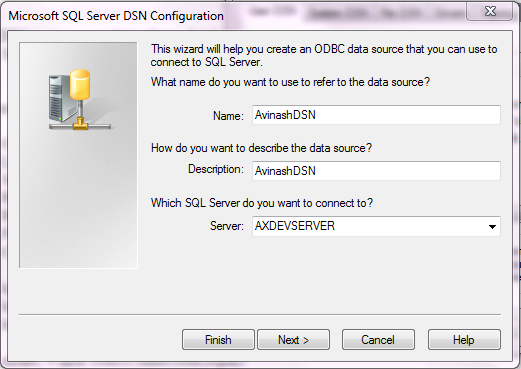
1. Start -> admministrative tools ->Datasources(ODBC) -> Add ->Sql Server->Finish.
Next, Next,Finish.

2.Write following job to set ODBC connection.
static void Job19(Args _args)
{
    OdbcConnection oDBC;
    LoginProperty  login;
    Statement      stmt;
    ResultSet      rs;
    ResultSetMetaData rsmd;
    FCCAirports    fCCAirports;
    CustTable      CustTable;
   
    login = new LoginProperty();
    login.setDSN("AVinashDSN");  
    login.setDatabase("DynamicsAXDemo");
   
    oDBC = new OdbcConnection(login);
   
    try
    {
        stmt = oDBC.createStatement();
        rs   = stmt.executeQuery("select AccountNum,currency from custtable");
   
        while(rs.next())
        {
            info(rs.getString(1));
            info(rs.getString(2));
        }
    }
    catch
    {
        error('Unexpected error');
    }
}

Thursday, 6 October 2016

Adding filter on form with one and multiple range values

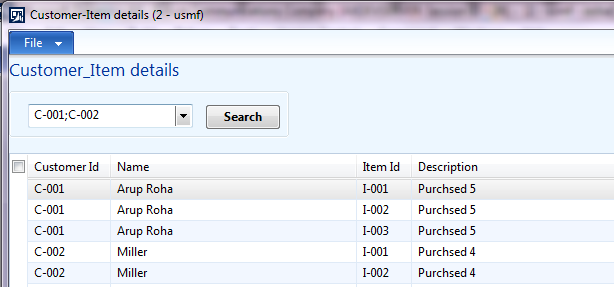
1.Created two tables and on e form


2. Take an EDT and give relation to PCustomerTable.CustomerId and extends to outbound control on form(openmode:edit)

3.


In clicked method
PCustomerTable_ds.filter(fieldNum(PCustomerTable,CustomerId),FilterButton.valueStr());

4.

For multiple selection:

In form methods:
public void multiLookup()
{
    Query query = new Query();

    QueryBuildDataSource qbds;

    qbds = query.addDataSource(tableNum(PCustomerTable));

    msCtrlCust = SysLookupMultiSelectCtrl::constructWithQuery(element, CustomerIDFilter, query);
}

public void init()
{
    super();
    element.multiLookup();
}

public class FormRun extends ObjectRun
{
    SysLookupMultiSelectCtrl msCtrlCust;
    container                values;
}

5. In PCustomerTable -->executequery()
public void executeQuery()
{
    PCustomerTable       ptc;
    PItemTransactions    pit;
    query                query;
    QueryBuildDataSource qbds,qbds1;
    QueryBuildRange      qbr;
    QueryRun             qr;
    int                  i;
    int64                r;
    container            c;

    ;

    query = new query();
    qbds  = query.addDataSource(tableNum(PCustomerTable));
    qbds1 = qbds.addDataSource(tableNum(PItemTransactions));
    qbds1.relations(true);


    values = msCtrlCust.get();
    for (i = 1; i <= conLen(values);i++)
    {
        r = conPeek(values,i);
        Ptc = PCustomerTable::find(r);
        c = conIns(c,i,Ptc.CustomerId);
    }
    qbds.addRange(fieldNum(PCustomerTable,CustomerId)).value(con2Str(c));
    qr = new QueryRun(query);
    while (qr.next())
    {
        ptc = qr.get(tableNum(PCustomerTable));
        PCustomerTable_ds.query(qr.query());
    }
    super();


}


Wednesday, 21 September 2016

Restrict mutiple logins of same user in ax 2012

Note:Compied from external source

Copy Paste the Following Code in startupPost method of info class in AOT

void startupPost()
{
// To restrict user login form second login
xSession session;
SysClientSessions SysClientSessions;
UserId currentUserId;
int counter;
;
currentUserId = curUserId();
if(currentUserId!="Admin")// Allow Admin User to login multiple time
{
while select SysClientSessions
where SysClientSessions.userId == currentUserId &&
SysClientSessions.Status == 1 // 1 : Login 0 : Logout
{
session = new xSession(SysClientSessions.SessionId, true);
if (session && session.userId())
{
counter++;
}
}
if(counter>=2)
{
Box::stop("Already Logged-in : The same user id can't log in twice.");
infolog.shutDown(true);
}
}
}